
HOW IT WORKSPlaceholder page. Full content, screen-recorded app demo videos, and step-by-step transcripts for connecting the device, uploading and processing match data, reviewing transcripts, and using the analytics page are coming soon.
From Pen to Report
STEP BY STEP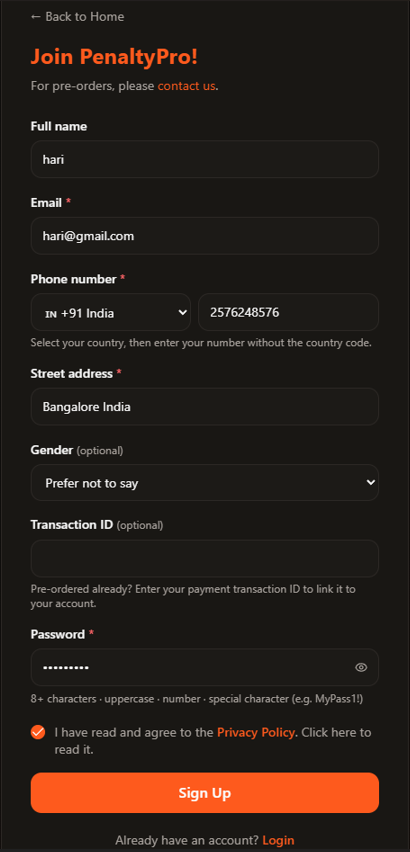
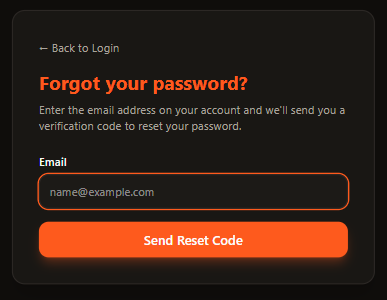 1. Request a reset code
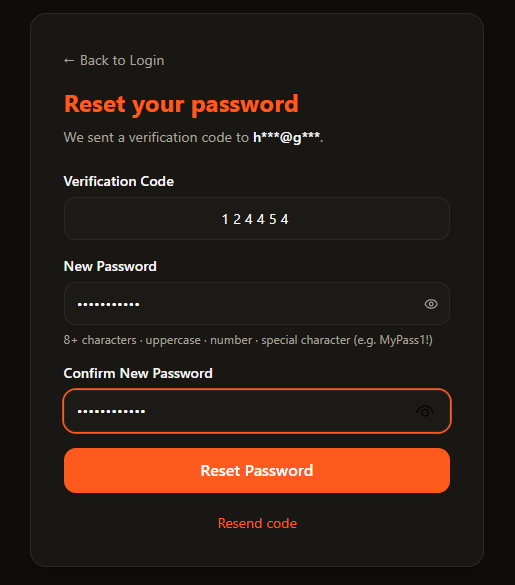 2. Enter the code & set a new password
Using the App
1
Create an Account (Sign Up)
PenaltyPro accounts are created on the main PenaltyPro website, not inside the mobile app. Once it's set up, you'll use the same email and password to log in on the website, the mobile app, and the desktop site.
- 1.Go to the Sign Up page on the PenaltyPro website.
- 2.Enter your full name, email, phone number with country code, and address, then choose a password. This is your account's password from here on — it's what you'll use to log in on the website, mobile app, and desktop site going forward.
- 3.Transaction ID and Gender are optional. If you already pre-ordered, you can enter your payment transaction ID to link it to your account — or leave both fields blank and add them later.
- 4.Read the Privacy Policy, then check the box confirming you've read it.
- 5.Click Sign Up to finish creating your account.
2
Sign In & Sign Out
How to log into the mobile app with your account, and sign out when you're done.
3
Forgot / Change Password
1. Request a reset code2. Enter the code & set a new passwordForgot your PenaltyPro password, or just want to reset it? The reset flow runs through the main website and updates the password you use everywhere — website, mobile app, and desktop site.
- 1.Click Forgot Password — this takes you to the PenaltyPro Forgot Password page.
- 2.Enter the email address you used to sign up.
- 3.Click Send Reset Code.
- 4.Check your inbox — including your spam folder, just in case — for the verification code.
- 5.Enter the verification code you received.
- 6.Enter your new password and confirm it by re-entering it.
- 7.Click Reset Password. That's it — you're set to sign back in with your new password.
4
Create a Match & Upload Data
How to create a new match in the app, upload your recorded match/foul data, and process it.
5
Review Page & Export Data
How to review your processed match data on the review page, then export it.
6
Analytics Page
How to read your match analytics in the app.